VPAY / USER GUIDE / BETA
Secure stablecoin payments
VPAY verifies who authorised a payment destination and what transaction will be signed. The browser prepares and transports data, but the Ledger application is the sole source of trust and performs the decisive verification.
Beta documentation. Screens and minor workflow details may change before production release.
Overview
What VPAY does
VPAY verifies counterparties and their stablecoin payment addresses—currently USDC and EURC—using national digital-signature systems, such as the European eIDAS framework. It also standardises and automates payment handling for both payer and recipient.
The complete system is independent of the software provider. The provider publishes only static files—JavaScript applications and signed CA lists—so users can perform operations conveniently and securely on their own computer or phone.
No permission from the software provider is required to use the software. Keeping this model permission-free is a permanent design principle of P4AZ.
The provider also plans counterparty-analysis services based on financial statements and auditor opinions carrying verifiable signatures. This additional evidence is intended to reduce the financial risk of cooperation, independently from payment-address verification.
Technical overview
The final trust decision remains on Ledger
Ledger performs the final validation of the applicable national signature profile and its certificate chain. Such signatures normally use a non-exportable private signing key held on a qualified device or an equivalent secure solution; the public certificate remains available as verification evidence.
The counterparty identifier and name derived from the signed organisation record are displayed on Ledger and must agree with the identity authorising the signed address proof. Ledger verifies that the transaction recipient and stablecoin match that signed proof. This protects those signed fields against substitution and impersonation even if the browser or delivery path is manipulated.
The Payment Request itself remains untrusted business input. Ledger validates its canonical structure and requires the blockchain transaction to contain the same technical payment fields, but this does not prove that the amount, request identifier, time or commercial terms are correct or authorised by the counterparty.
Additional fraud barriers include requiring the signed recipient files to be published under the declared domain, from which they are retrieved for verification. Independent recipient-managed signatures will be implemented as an additional layer of protection.
Together, these controls provide the strongest practical protection currently available without inserting the software provider into the execution or authorisation of the cryptocurrency payment itself.
Why a VPAY payment is safer
The organisation and every payment address are protected by an accepted electronic-signature profile. Ledger verifies the signature, the complete certificate chain to an accepted national trust list, the signed identity and the exact address and asset. It separately parses the untrusted Payment Request and checks the transaction against its technical fields.
The first implemented example is the European XAdES profile with certificates evaluated according to the eIDAS trust model. The architecture is designed for additional versioned signature profiles and national trust systems without moving verification into JavaScript.
The qualified signature proves only the exact payload it covers. For an organisation record, this is the counterparty identity. For an address proof, this is the authorised payment address, network and asset. Ledger rejects a recipient or asset that differs from that signed evidence.
The payment amount is not covered by the counterparty's qualified signature. Ledger checks that the amount and other Payment Request fields match the blockchain transaction and displays them for the user to assess before signing. This proves only technical consistency with what is displayed—not the authenticity, commercial correctness or counterparty authorisation of the Payment Request.
A future auxiliary signature will not by itself make a Payment Request trustworthy. That would require a separately defined trusted issuer, an exact signed scope and an acceptance policy.
Unknown formats, algorithms, certificates and malformed signed evidence fail closed.
Supported stablecoins: USDC and EURC.
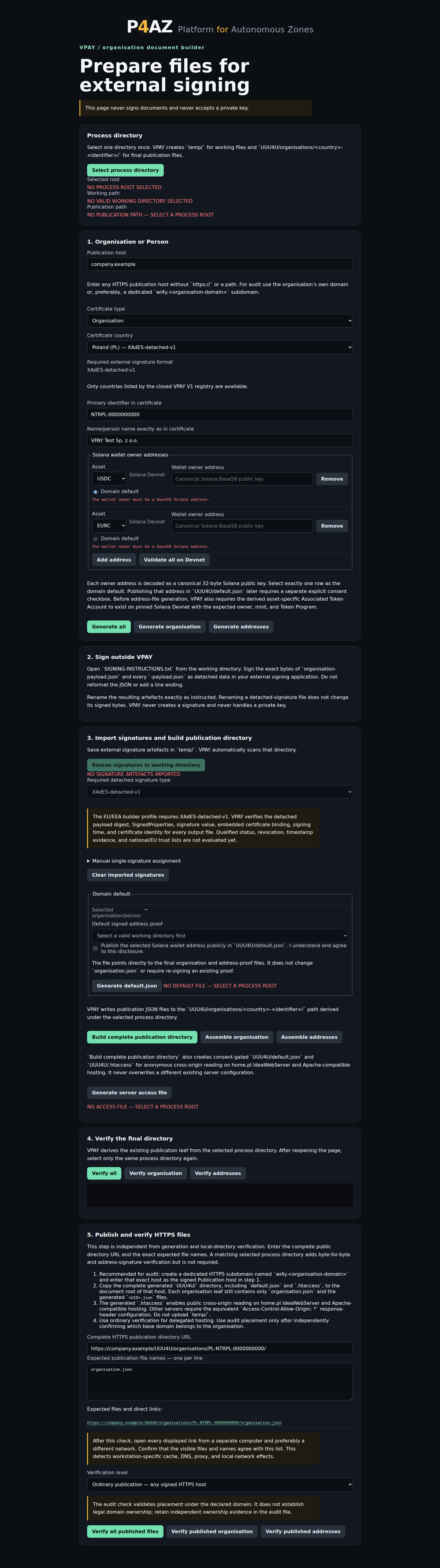
Create an organisation publication
- Open the Organisation builder and select one local process directory.
- Enter the certificate-aligned organisation or person identity, publication domain and supported Solana destinations.
- Generate the canonical organisation and address payloads.
- Sign every payload externally with the qualified signing application. VPAY never receives a private signing key.
- Return the XAdES files to the process directory and build the publication directory.
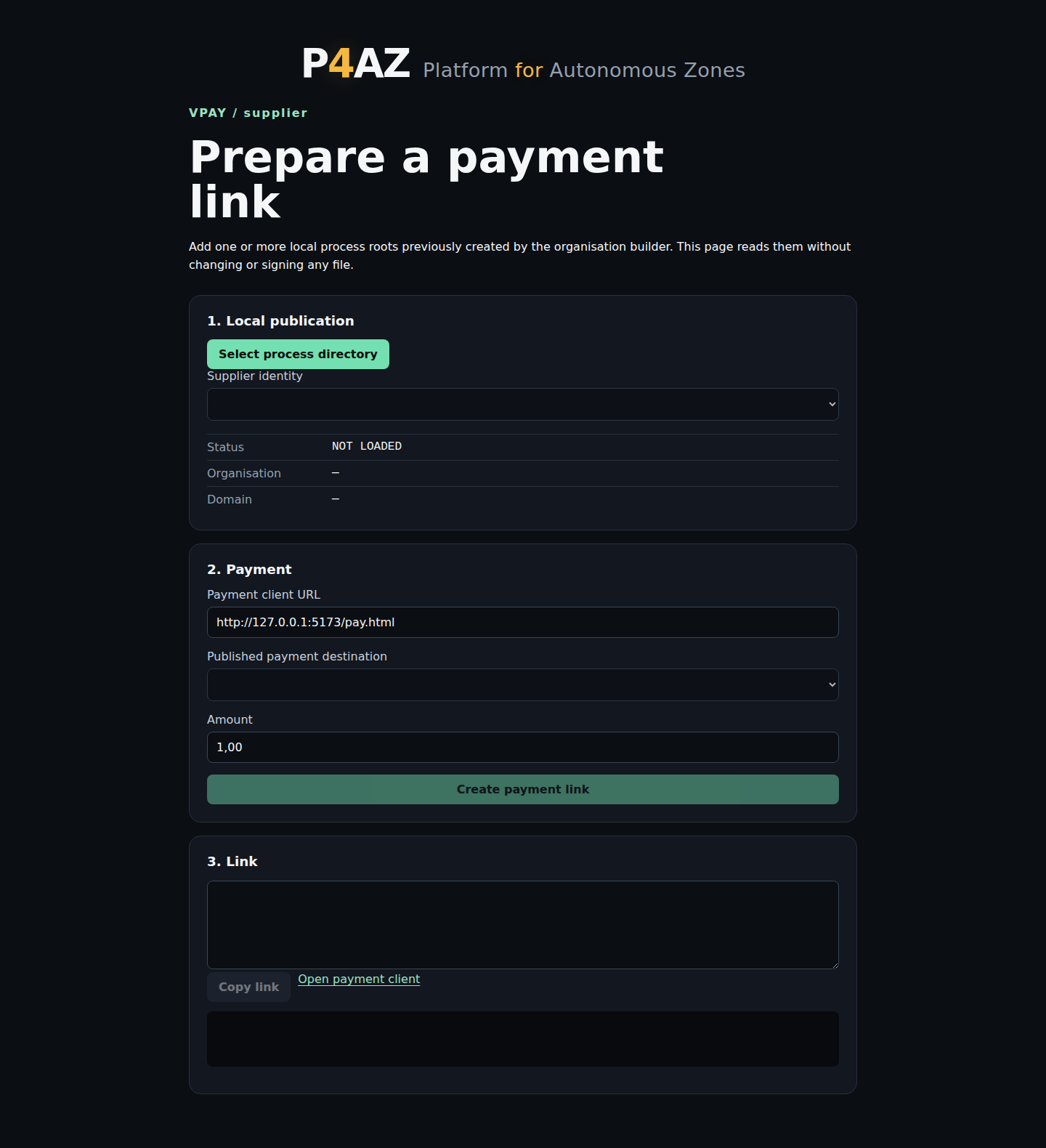
Prepare a Supplier payment link
- Open Supplier and add the organisation's local process directory.
- If the directory contains several identities, select the correct organisation from the list.
- Select the signed payment destination and enter the amount.
- Create and send the resulting locked payment link to the customer.
The link carries a complete payment context and ignores domain defaults. The payer cannot edit its supplier, recipient, asset or amount.
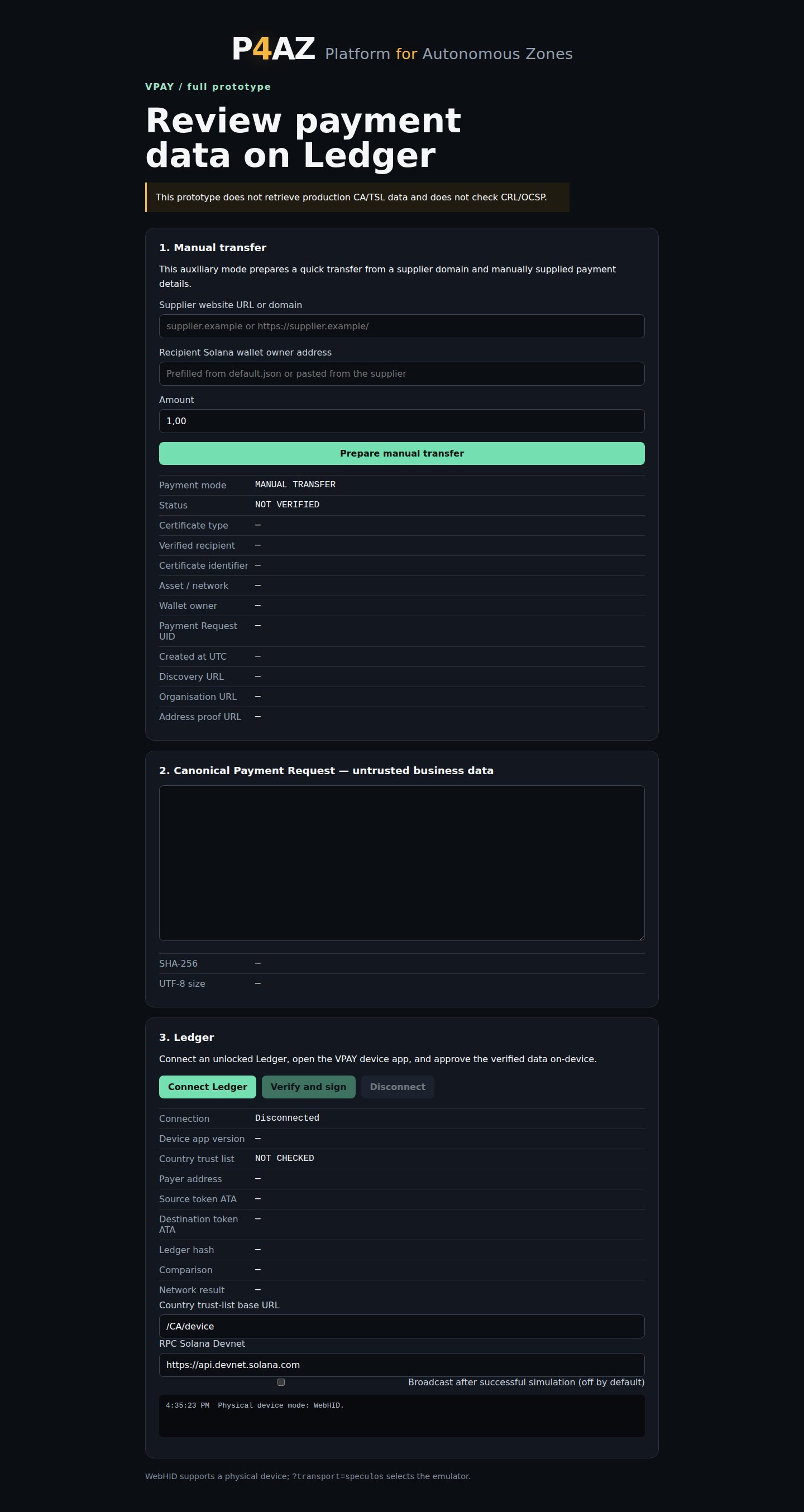
Make an auxiliary manual payment
- Open the payment client without a Supplier Link.
- Enter the supplier website, recipient address and amount.
- Prepare the transfer, connect Ledger and open the VPAY application.
- Review the independently verified data on Ledger and approve only when it matches the intended payment.
Pay from a Supplier Link
- Open the link received from the supplier. The payment client clearly identifies the locked Supplier Link mode.
- Confirm the displayed supplier, organisation, amount and recipient.
- Connect Ledger and start verification. The browser supplies the publication, CA list, Payment Request and transaction in bounded parts.
- Ledger verifies each element sequentially, displays the trusted result and signs only after approval.
- The client simulates the signed transaction before any permitted network submission.
Supplier Link uses the same Payment application shown above. A populated example is intentionally omitted because payment data would be required.
What the device verifies
Ledger processes bounded inputs sequentially so large signature files do not need to coexist in trusted memory. It retains only the verified state required by the next step. The same architecture can later support additional versioned signature profiles without moving trust into JavaScript.